

Search for works, queue them for acquisition, check each PDF against the requested work, and offer it toward your library — from the terminal or from a coding agent.
Zotero users get preview-first import through zotio. Users of papis, Calibre, plain folders, or custom scripts get a best-effort handoff through a one-line on_ready hook; hook failures never fail or retry the acquisition job.
Finding citations is easy; getting the PDFs, legitimately, is the tedious part. papio retrieves PDFs through open, licensed, or user-authorized institutional sources. It verifies each PDF and offers it to your library without handling your university credentials.
How it works
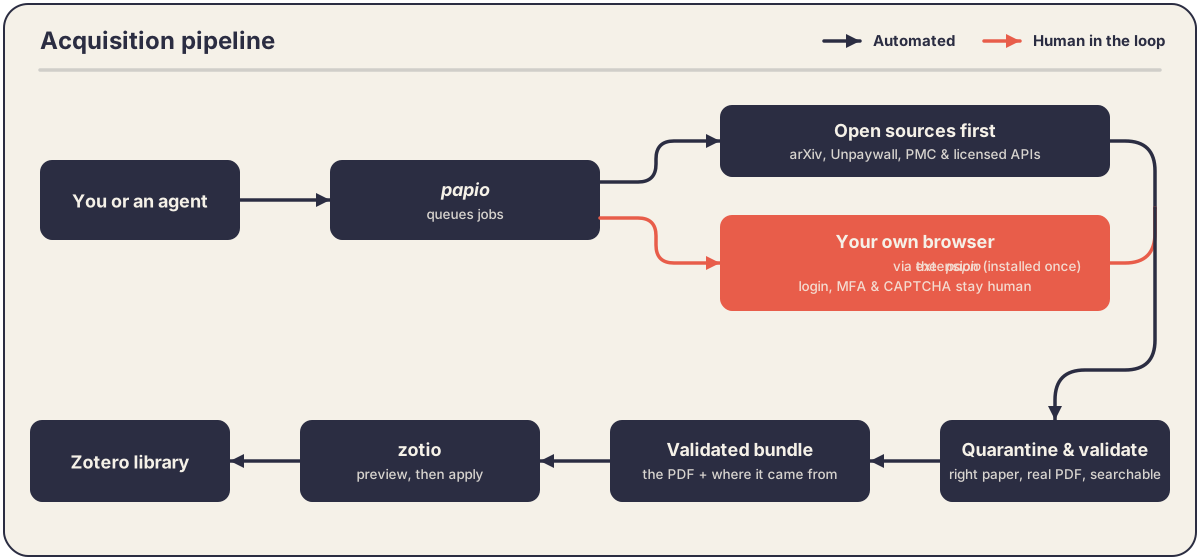
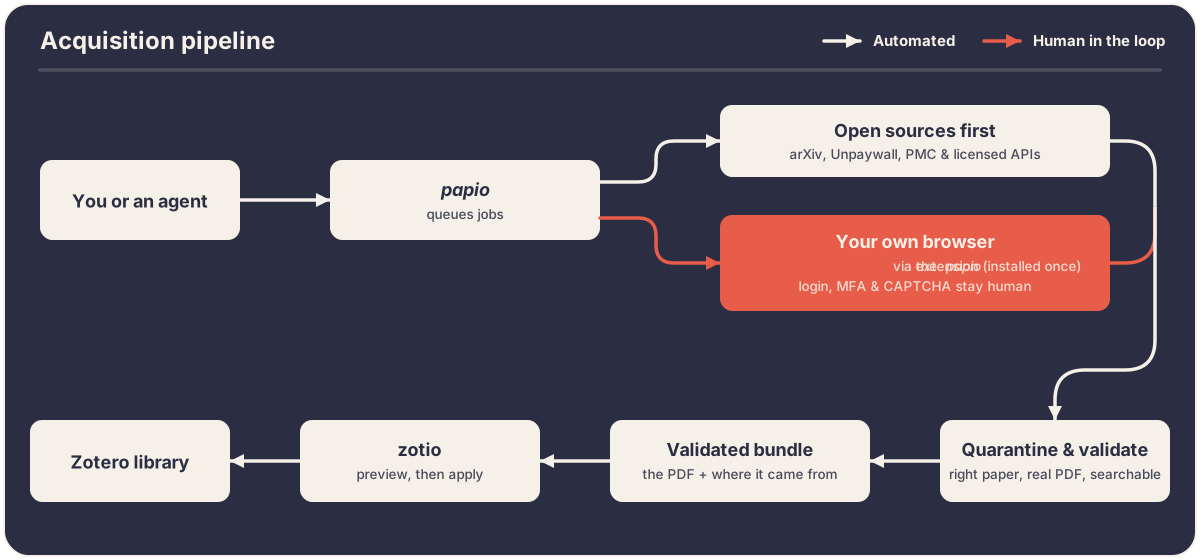
Every request becomes a job. papio ranks the possible sources and tries them in order; it does not accept the first URL it finds:
- Discover.
papio searchreturns read-only OpenAlex results and, when zotio or a configuredlibrary.sourcesauthority is available, marks works already in your library; without either, results are unowned/unclassified. - Acquire. A batch (up to 50 works) or a single work creates jobs with unique IDs. Repeating a request reuses a matching live job; after a job reaches a terminal state, a new request can start a new job.
- Find & download. Open-access and licensed sources are tried before institutional access; each candidate is downloaded under strict size and time limits, then held in quarantine.
- Validate. Every PDF must pass checks on its structure, its identity, and — if needed — a text scan before it is trusted; anything ambiguous waits in
needs_review. - File. Validated PDFs use Zotero's
zotiopreview-and-confirmation path. Filing anywhere else — papis, Calibre, a plain folder, your own script — is a best-efforton_readyhook handoff; hook failures never fail or retry the acquisition job.
| Stage | Source / tooling | Handles credentials? |
|---|---|---|
| Discovery | OpenAlex (read-only) | No |
| Download — open | arXiv · Europe PMC · Unpaywall · OpenAlex · Semantic Scholar · OpenAIRE · Open Books (IRIS; OAPEN opt-in) · CORE and Crossref TDM with a key | No (API keys only where configured) |
| Download — institutional | OpenURL handoff in your ordinary browser session | No — login/2FA/CAPTCHA stay human |
| Validation | Local PDF structure + identity + OCR (Poppler, Tesseract) | No |
| Library filing | zotio — preview (plan) then confirmed apply for Zotero · best-effort on_ready handoff for papis, a folder, or your own script; hook failures never fail or retry the job |
No — papio never stores Zotero credentials |
papio runs in one of three access modes — conservative, assisted, or delegated. A fresh papio init chooses conservative; institutional handoff opens a browser only under assisted/delegated, and even then automation stays inside legitimate, user-authorized access.
Quickstart
papio init                                                   # guided setup: config, data folder, database, browser connector, health check
papio doctor                                                 # verify readiness: sources, PDF tools, zotio
papio search "appropriate reliance on AI" --limit 20 --year-from 2023
papio acquire 10.1371/journal.pone.0262026 --auto-import --wait  # requires zotio
papio acquire --from-zotio                                    # queue up to 25 missing Zotero attachments
papio acquire --batch refs.bib                                 # or RIS, CSL-JSON, NBIB — start from the library you already have
papio status --follow                                        # working / awaiting-human / needs-review / ready / failed
papio actions list                                           # open browser handoffs and identity reviews
Run papio doctor any time to see readiness across papio, the browser extension, its connector, and zotio.
New here? Start with the user guide, then tune policy in the configuration reference.
Where to go next
- Getting started — prerequisites,
papio init, and your first acquisition end to end. - User guide — the research workflow: discover, acquire in batches, follow jobs, complete a browser pass, and resolve identity reviews.
- Filing: Zotero, papis & more — where validated PDFs are offered: the zotio/Zotero preview boundary, and the best-effort
on_readyhook for papis, Calibre, a plain folder, or your own script. - Use in a coding agent — drive papio from an agent: the
SKILL.mdthat runs the CLI directly (preferred),papio mcpfor MCP-only hosts, the canonical acquisition loop, and its safety semantics. - Access modes & safety —
conservative/assisted/delegatedand the non-negotiable product and safety boundaries. - Acquisition pipeline — the order papio tries sources, how candidates are ranked, job states, and download limits.
- Browser handoff — the ordinary-browser extension, its local connector, the minimized work window, and why papio never uses an automated browser.
- Validation & provenance — PDF structure, identity, OCR gates, and the permanent acquisition bundle.
- Command reference — every
papiocommand and its flags. - MCP tools — the
papio_command_searchandpapio_command_runcommand facade, thepapio_acquire_batchandpapio_batch_waitcomposite tools, and read resources, with parameters and boundaries. - Configuration — every TOML key, default, constraint, and effect.
- Troubleshooting — extension reload, version mismatches,
doctor, and the stable zotio error classes.