CI for your bibliography
Gate a paper, thesis, or review repository on the health of its Zotero library — and wear the result as a live badge.
The building blocks are all in the CLI: library health exits 11 when findings meet your severity bar (--fail-on critical|high|info|any|none), 12 when the local mirror is stale (--require-fresh), and 9 when a required precondition is missing — and --badge emits shields.io endpoint JSON. A CI job runs library health and fails on a non-zero exit code.
The GitHub Action
zotio: bibliography health for Zotero packages install → sync → gate:
# .github/workflows/bibliography.yml
name: Bibliography health

on:
  pull_request:
  push:
    branches: [main]
  schedule:
    - cron: "0 6 * * *"   # your library drifts outside git — check daily

permissions:
  contents: read

jobs:
  bibliography:
    runs-on: ubuntu-latest
    steps:
      - uses: OrgMentem/zotio-action@v1
        with:
          api-key: ${{ secrets.ZOTERO_API_KEY }}
          for: citation
          fail-on: high
          check-retractions: "true"
          badge-path: badge.json
Why the cron matters: a normal CI gate runs when the repo changes, and your Zotero library changes when you import a paper, with no push and no PR. The schedule catches library drift (and freshly issued retractions) within a day instead of at submission time. The action also writes a verdict table to the job's step summary and exposes exit-code/message/color outputs for downstream steps.
Create a Zotero API key with read access at zotero.org/settings/keys and store it as the ZOTERO_API_KEY repository secret — CI runners have no Zotero desktop, so the Web API key is required there. The action verifies the key up front, masks it in logs, and resolves your user ID automatically.
check-retractions: "true" extends the gate to retracted papers, via Crossref's Retraction Watch data.
Gate on what changed
Legacy libraries often have standing findings that take time to unwind. An absolute fail-on: high gate is useful for greenfield repositories, but on older libraries it trains everyone to ignore a permanently red banner while new problems slip in beside known debt.
Use a cached baseline instead: the first run records today's library, and later runs fail only when the PR or overnight library drift introduces new high-or-worse findings.
      - uses: OrgMentem/zotio-action@v1
        with:
          api-key: ${{ secrets.ZOTERO_API_KEY }}
          for: citation
          fail-on: none
          fail-on-new: high
          baseline: "true"
With the default cache enabled, that recipe is quiet when nothing changed and loud when a new finding appears; the badge reads no new findings in bright green even if the legacy library still has old findings below the baseline. The action can also post the sticky PR comment, open a deduplicated issue on new retractions, check a manuscript via manuscript, publish a shields endpoint to a gist, and persist the zotio store cache between runs.
Gate the manuscript too
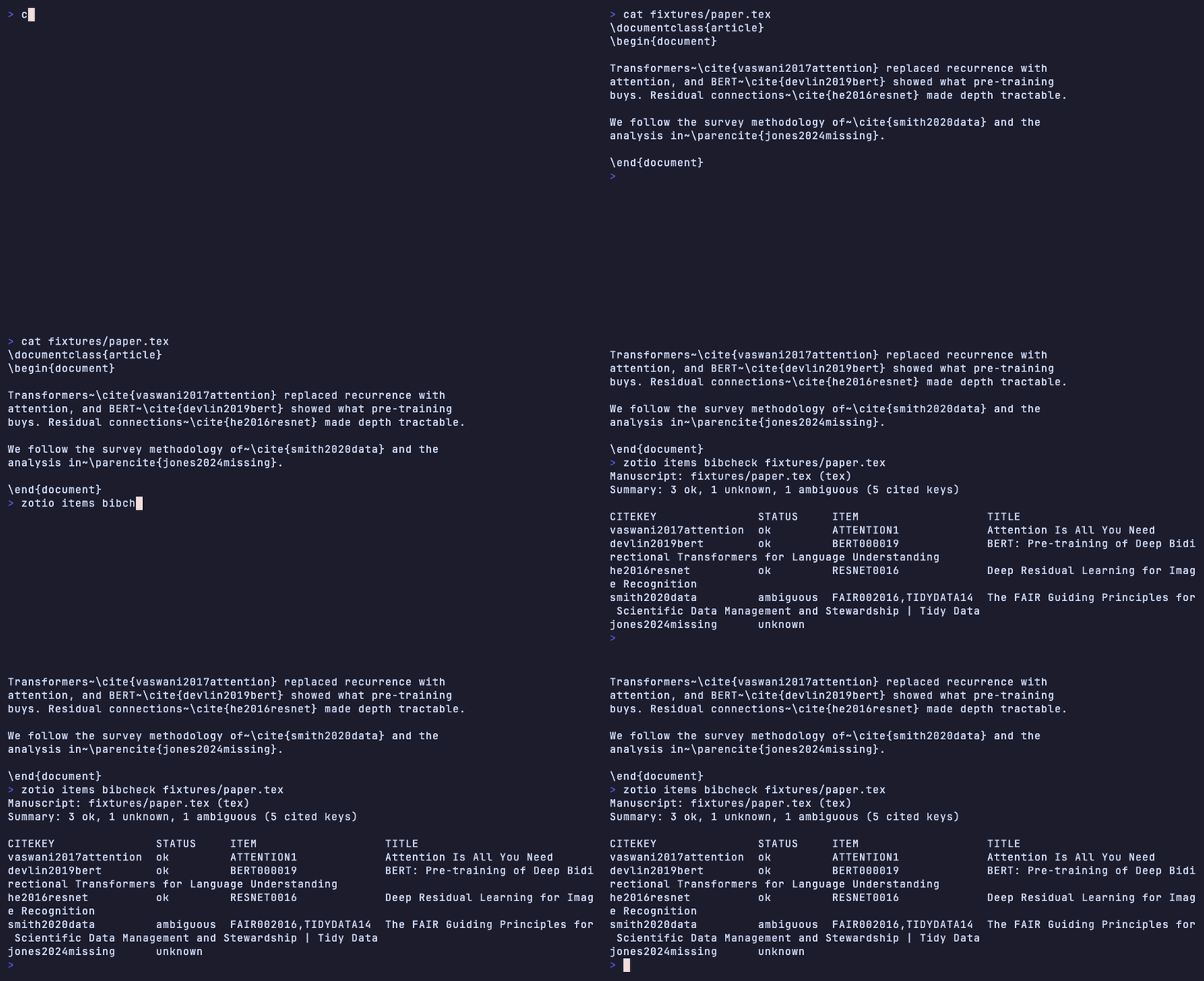
The library gate catches bad references; items bibcheck catches the reverse — citekeys a manuscript cites that the library can't back (unknown or ambiguous keys), plus cited items missing citation-core fields. Pass one or more LaTeX, Pandoc, Word (.docx), or LibreOffice (.odt) files. For a thesis whose chapters are pulled in with \input{…} or \include{…}, add --follow-includes so the chapters are checked too; a missing or cyclic include then fails the run:
      - run: zotio items bibcheck thesis.tex chapters/*.md --follow-includes --fail-on-unknown   # exit 11 on unknown/ambiguous citekeys or a broken include
      # --fail-on critical|high|info|any|none gates on finding severity instead, and also flags incomplete citations
To publish the bibliography the manuscript actually cites, export it with --manuscript instead of a scope. It uses the same parser and citekey resolution, keeps each item once in first-citation order, and writes nothing when a citekey is unknown or ambiguous: it names the file and line and exits 11. --manuscript and --scope cannot be combined (exit 2). Add --follow-includes to read chapters pulled in with \input{…} or \include{…}, exactly as bibcheck does; a missing or cyclic include also writes nothing and exits 11:
- run: zotio items bibliography --manuscript thesis.tex --follow-includes --format biblatex > references.bib
Word and LibreOffice manuscripts
items bibcheck and items bibliography --manuscript also read the Zotero citation fields in .docx and .odt files, so a manuscript written with the Zotero plugin needs no LaTeX or Pandoc source:
      - run: zotio items bibcheck thesis.docx --fail-on-unknown
      - run: zotio items bibliography --manuscript thesis.odt --format bibtex > references.bib
zotio matches each cited item by its Zotero item key against the library you target (--group <id> for a group library). An item that is missing, deleted, trashed, or from another library is reported as unknown and exits 11 with --fail-on-unknown. Findings name the paragraph that holds the field (thesis.docx:3). A damaged field, or a citation with no usable item URI, is also reported as unknown. A file that is not a ZIP archive, or that has no document part, exits 2. A file whose document XML cannot be parsed exits 1.
Retracted papers the manuscript cites
A library-wide retraction check is noisy because people keep retracted papers on purpose. To ask only about the papers one manuscript cites, add --check-retractions:
bibcheck resolves each citation to a library item, then asks CrossRef about the DOI of exactly those items. A retraction is a critical retracted_item finding. An expression of concern is a high expression_of_concern finding. Both name the manuscript file and line that cites the paper. Corrections are not reported. With --fail-on high, a retraction or concern exits 11.
The check uses the network, so it is off unless you pass the flag. If CrossRef cannot be reached, or a lookup fails, bibcheck does not report a clean result. It lists the skipped lookups in the output and in the JSON skipped field, and with --fail-on it exits 9. The JSON retractions field gives the counts of cited items checked, flagged, and unchecked (no DOI, or a failed lookup).
Gate on drift from a committed snapshot
export snapshot writes your data plus a sidecar manifest (<output>.manifest.json) that pins each item by key and a normalized content hash. Commit that manifest next to a curated reading list or systematic-review corpus, and CI can fail when the live library diverges from the pinned set:
zotio export snapshot collection:ABCD1234 --output corpus.jsonl      # regenerate and commit intentionally
zotio export snapshot verify corpus.jsonl.manifest.json --fail-on-drift  # exit 11 on added/removed/changed items
Because verify compares content hashes rather than Zotero version integers, an item whose version bumped with no content change is reported as touched and never trips the gate — only genuine additions, removals, and content edits do.
Systematic-review corpora
For a screening corpus, zotio library prisma --scope collection:KEY reports PRISMA 2020 identification-stage counts — records identified (broken down per source database), duplicate records removed, and records after deduplication — the numbers that drop straight into a flow diagram.
Attachment storage checks
--for all also reports two attachment-storage findings from the local mirror, both at info severity, so a --fail-on high gate does not change. nonportable_attachment names each PDF child stored as a linked file: its bytes stay on one computer and other devices or group members see only the path. zotio does not upload the file; convert it to a stored file in Zotero desktop if others need it. duplicate_attachment_bytes groups stored attachments that share a Zotero-registered MD5, marks each group same_parent or cross_parent, and gives reclaimable bytes when Zotero reported the size. A shared MD5 is evidence, not proof, and zotio never deletes by hash. Run the same report alone with zotio items audit --duplicate-attachment-bytes [--scope EXPR]. No other preset runs these checks.
Publish the badge
badge-path writes shields endpoint JSON even when the gate fails, so the badge always reflects the latest result. Publish it anywhere shields can reach (GitHub Pages, a gist, any static host) and embed:
This site does exactly that: the zotio README badge is regenerated from the maintainer's real library on every docs deploy.
Exit codes
| Code | Meaning |
|---|---|
0 |
Gate passed. |
9 |
Setup/precondition failure (missing key, unmet check requirement, unsynced store, or a --baseline file that does not exist when --fail-on-new is set). |
11 |
Quality gate failed — findings at or above --fail-on, new findings at or above --fail-on-new, or doctor --fail-on with an error. |
12 |
Freshness gate failed (--require-fresh, or doctor --fail-on with a stale check). |
--baseline reads finding identities from a file. If the file does not exist, library health reports baseline: not found and diffs nothing; with --fail-on-new it exits 9 instead of passing. Create the file with --write-baseline once to record the baseline. On a first run there is no file, so skip --fail-on-new then (see the script below). An invalid --fail-on value exits 2 before any work.
Without the action
Any CI system works. The action wraps these steps:
brew install orgmentem/tap/zotio          # or download a release binary
export ZOTERO_API_KEY=...                 # and ZOTERO_BASE_URL=https://api.zotero.org/users/<id>
zotio sync
baseline="${HOME}/.local/share/zotio/health-baseline.json"
gate=(--fail-on-new high)
[ -f "$baseline" ] || gate=()   # first run: no baseline yet, record one
zotio library health --for citation \
  --fail-on none \
  --baseline "$baseline" \
  --write-baseline "$baseline" \
  "${gate[@]}" \
  --report health-report.json \
  --badge > badge.json